How to detect GDI handle leaks
Working with GDI in Windows, whether you’re using Win32 calls or MFC, you’re concerned with pens, brushes, fonts, bitmaps and regions for drawing. You may also be concerned with Palettes, although with our full-colour displays these days working with palettes is something of a rarity.
The typical way to work with a GDI object, for example, a pen, is shown below. Create the pen, select it into the DC, do the drawing, select the original object back into the DC, and delete the pen.
void CtestGDISelectObjectDlg::drawSomethingWithARedPen(HDC hDC)
{
	HPEN		hPen;
	HPEN		hPenOld;
	HGDIOBJ		retVal;

	hPen = ::CreatePen(PS_SOLID, 0, RGB(255, 0, 0));

	hPenOld = (HPEN)SelectObject(hDC, hPen);

	doDrawing1(hDC);

	retVal = SelectObject(hDC, hPenOld);

	DeleteObject(hPen);
}
When working with device contexts and GDI objects, it’s important to save the old object when selecting a new one into the device context. This ensures that you can restore the original object and properly clean up resources, preventing leaks.
So far so good. But there is more than one way to leak a GDI resource handle.
Leaking GDI objects, type 1
The most common way people leak GDI objects is because they simply forget to delete them. Here’s the previous example, modified to leak the pen. (Don’t do this!).
void CtestGDISelectObjectDlg::drawSomethingWithARedPen(HDC hDC)
{
	HPEN		hPen;
	HPEN		hPenOld;
	HGDIOBJ		retVal;

	hPen = ::CreatePen(PS_SOLID, 0, RGB(255, 0, 0));

	hPenOld = (HPEN)SelectObject(hDC, hPen);

	doDrawing1(hDC);

	retVal = SelectObject(hDC, hPenOld);
}
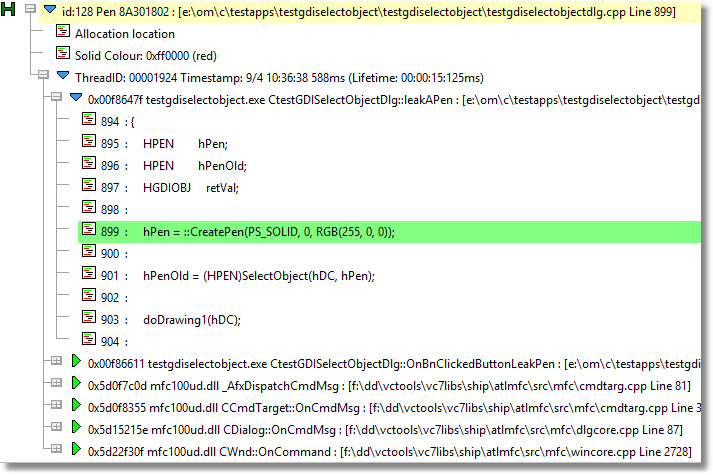
The author of the code forgot to delete the pen using DeleteObject(hPen). This leak looks like this in Memory Validator.
Leaking GDI objects, type 2
There is another way to leak GDI objects, even when you think you’ve deleted all the objects you created. Take a look at this code. Does it leak?
	HPEN		hPen1;
	HPEN		hPen2;
	HPEN		hPenOld;
	HGDIOBJ		retVal;

	hPen1 = ::CreatePen(PS_SOLID, 0, RGB(255, 0, 0));
	hPen2 = ::CreatePen(PS_DASHDOTDOT, 0, RGB(255, 0, 0));

	hPenOld = (HPEN)SelectObject(hDC, hPen1);

	doDrawing1(hDC);

	retVal = SelectObject(hDC, hPen2);

	doDrawing2(hDC);

	DeleteObject(hPen1);
	DeleteObject(hPen2);
A quick examination shows that two pens are created, some work is done with each pen, then the pens are deleted.
No leaks, right?
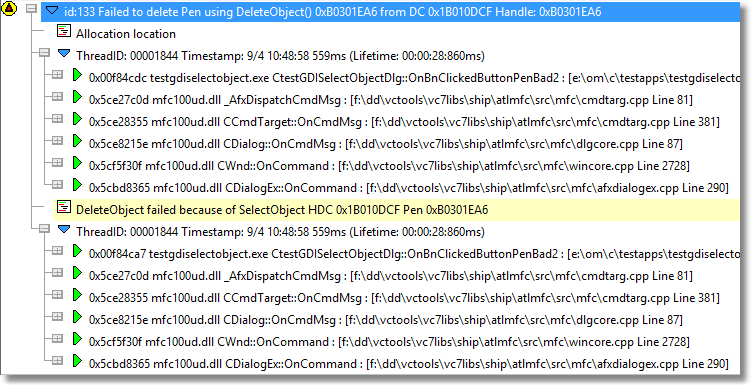
Wrong! hPen2 was selected into the DC for use with doDrawing2() but was not deselected from the DC prior to DeleteObject(hPen2);. This means that the call to DeleteObject() will fail as the pen is still in use. In this example, hPen2 has been leaked.
Memory Validator can detect this (as of V7.38, released today). Here’s what that looks like:
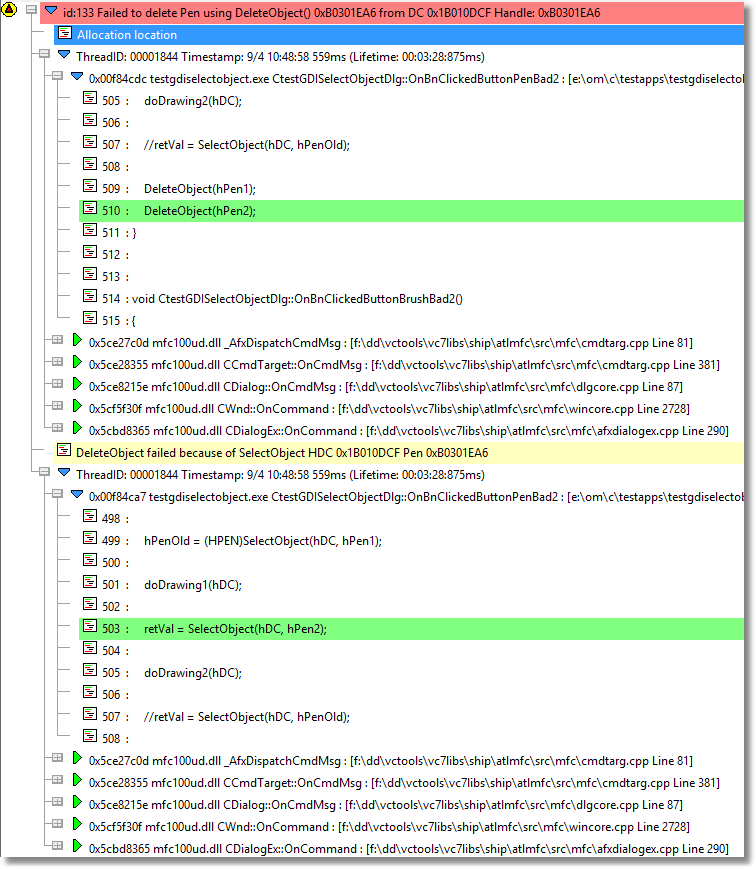
Expanding the source and you can easily see the failed DeleteObject() call and the SelectObject() call that mean the object was still in use.
Here’s what the non-leaking code should look like:
	HPEN		hPen1;
	HPEN		hPen2;
	HPEN		hPenOld;
	HGDIOBJ		retVal;

	hPen1 = ::CreatePen(PS_SOLID, 0, RGB(255, 0, 0));
	hPen2 = ::CreatePen(PS_DASHDOTDOT, 0, RGB(255, 0, 0));

	hPenOld = (HPEN)SelectObject(hDC, hPen1);

	doDrawing1(hDC);

	retVal = SelectObject(hDC, hPen2);

	doDrawing2(hDC);

	SelectObject(hDC, hPenOld);

	DeleteObject(hPen1);
	DeleteObject(hPen2);
The difference between the leaking and non-leaking versions is that the non-leaking code restores the original object before deleting, ensuring no GDI object is deleted while still in use (still selected in a DC).
To ensure your object is not still selected into the DC you can select the value that was returned to you by the first call (hPenOld in the code above), or you can select a stock object into the DC instead. For example:
SelectObject(hDC, GetStockObject(BLACK_PEN));
Performance Impact
GDI object leaks can have a profound effect on the performance and stability of a Windows system. When GDI objects are allocated but not properly released, they accumulate in memory, leading to memory leaks and a gradual depletion of critical system resources. As the number of allocated GDI objects grows, the available pool of GDI handles and device contexts shrinks, which can slow down the entire system and increase latency for all running processes.
One of the first signs of a GDI object leak is a rising GDI object count, which you can observe in the Windows Task Manager. While Task Manager provides a quick way to monitor the number of GDI objects used by each process, it doesn’t always offer detailed information about which objects are leaking or where in your code the leaks originate. If left unchecked, GDI leaks can eventually exhaust system resources, causing applications to fail, windows to stop rendering correctly, or even the entire system to crash. This is especially problematic for applications that create and manipulate many bitmaps, fonts, or other GDI resources, as these objects can quickly consume the available GDI handles.
Beyond performance degradation, GDI object leaks can introduce subtle bugs and instability. For example, as the system runs out of GDI resources, you may notice fonts or bitmaps failing to display, windows not refreshing properly, or unexpected crashes. These issues can be difficult to diagnose without the right tools, as the root cause is often buried deep within the application’s resource management logic.
To address these challenges, developers should regularly monitor GDI object counts and use specialized tools that provide detailed information about GDI object leaks. Tools like Memory Validator can help pinpoint the source of leaks, offering insights into which objects are not being released and where in the code the leaks occur. By identifying and fixing GDI leaks early, developers can prevent resource exhaustion, reduce the risk of crashes, and ensure a smoother user experience.
Ultimately, managing GDI objects responsibly is essential for maintaining the health of both your application and the overall Windows environment. By keeping a close eye on GDI object usage, releasing resources promptly, and leveraging diagnostic tools, developers can avoid the pitfalls of GDI object leaks and deliver stable, efficient software.
Conclusion
When working with GDI objects you need to keep track of two things:
- Creation and Deletion of GDI objects. For every pen, brush, font, bitmap, and palette that you create you must delete those objects when you are finished with them. Delete objects using DeleteObject().
- You need to ensure that none of the objects that you create is selected into a DC when you try to delete them.
Can your memory leak tool detect both types of GDI handle leak?
Memory Validator can detect both types of GDI handle leak.