The Memory Allocation Hooks tab allows you to enable and disable every hook or group of hooks that Memory Validator uses to track memory allocations.
The picture below doesn't show all the options, but the default is to have everything enabled (ticked):
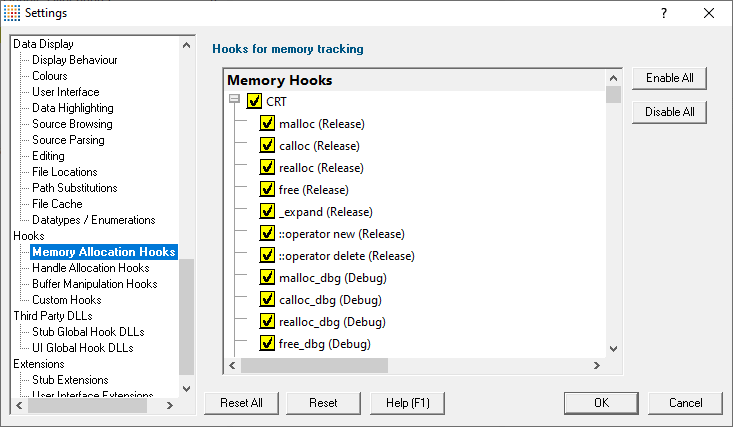
Memory hooks
Enable or disable a hook by ticking or unticking the yellow boxes.
 Note that because the C runtime is provided in both Release and Debug, some function names are present twice, with their status indicated in brackets.
•Enable All  ticks all the hooks, enabling everything
•Disable All unticks everything
Memory hook groups
All the hooks in the following groups can be enabled and disabled at once by ticking the group checkbox
•CRT the C runtime hooks for release and debug libraries MSVCRT.DLL / MSVCRTD.DLL
•Memory allocation the HeapAlloc, VirtualAlloc, GlobalAlloc and LocalAlloc function groups
•LocalAlloc allocations by other functions functions that use LocalAlloc to allocate workspace that should be freed by the caller
•GlobalAlloc allocations by other functions functions that use GlobalAlloc to allocate workspace that should be freed by the caller
•CoTaskMemAlloc allocations by other functions functions that use CoTaskMemAlloc to allocate workspace that should be freed by the caller
•COM/OLE Allocators CoTaskMemAlloc function group and IMallocSpy
•BSTR Allocations SysAllocString function group and VariantClear
•Net API Allocations NetApiBufferAllocate function group
•Misc Allocations miscellaneous functions that allocate and deallocate objects for various API areas such as security and encryption
•Fortran 95 Allocations
•Delphi allocations
 For details on the contents of each of these hook groups consult the Hook Reference.
Reset All - Resets all global settings, not just those on the current page.
Reset - Resets the settings on the current page.