The File menu allows you to close the program.
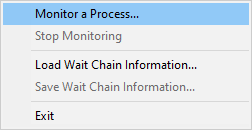
File menu  Monitor a Process... displays the process chooser to allow you to choose which process to monitor.
File menu Stop Monitoring stops monitoring the process and clears the display.
File menu Load Wait Chain Information... loads wait chain information from a file and displays it.
File menu Save Wait Chain Information... save wait chain information to a file.
This can be useful for saving wait chain information for diagnosis at a later time, and for diagnosis by a colleague.
File menu Save Minidump... save a minidump of this process.
A create minidump dialog is displayed asking you where to save the minidump.
File menu Launch Thread Validator... launches Thread Validator to attach to the running process.
Once Thread Validator is attached to the process you can use the Query menu to display callstacks for each thread in the process.
This only works with the full product version of Thread Validator. It won't launch the evaluation version of Thread Validator.
File menu Exit closes Thread Wait Chain Inspector