Python Coverage Validator
Python Coverage Validator is a code coverage software tool for use by software developers and software quality assurance testers using Python 2.2.
Use Python Coverage Validator to:
- Determine code coverage for your software projects.
- Identify untested functions in your unit tests.
- Improve your software quality testing with interactive, real-time code coverage displays.
- Merge code coverage data to provide aggregate code coverage results for all your unit tests.
- Compare code coverage data to allow you to spot code coverage improvements and code coverage regressions.
- Command line API to support automated code coverage testing (Jenkins, etc).
- Create code coverage reports for your regression tests and overnight builds.
- Generate code coverage reports at the same time as creating unit test reports.
2 Minute Video
Interactive code coverage is a snap with Python Coverage Validator.
5 step python code coverage
To use Python Coverage Validator, all you need is your python program and a Python 2.x runtime. Python 3.x is not currently supported.
You do not need to modify your software to use Python Coverage Validator.
- Launch your application with Python Coverage Validator.
- Run your application as normal.
- Optional: Examine the code coverage statistics that are generated as your application runs. The data updates in real time.
- Close your application.
- Examine the code coverage statistics after your application has finished.
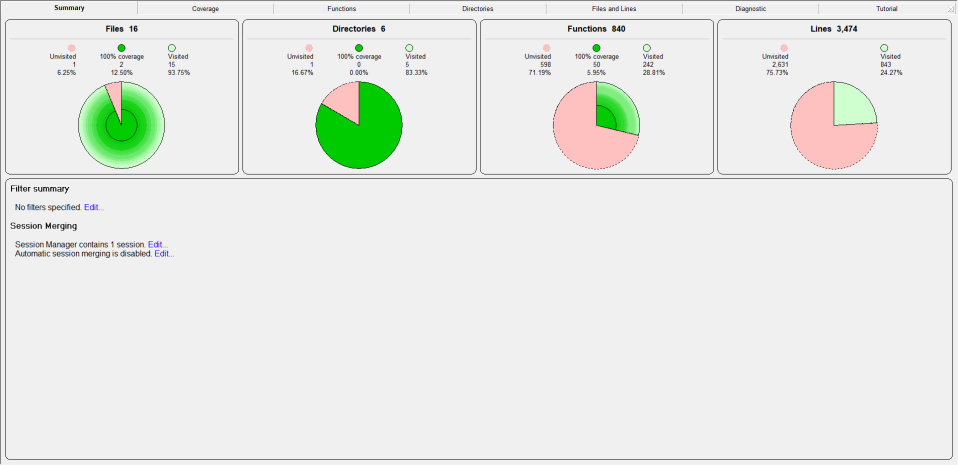
Easy to read data displays show you the code coverage as your application executes. You do not need to wait until your application has finished to view statistics for any function, file or DLL. The displays can be filtered to show you only the information that you want to work with.
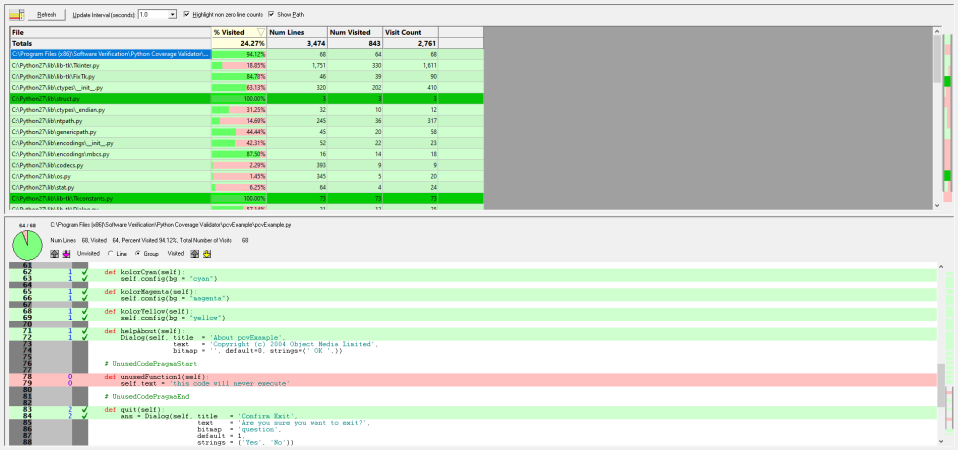
Detailed, colour coded source code shows at-a-glance which functions and lines have been visited and how many times each line has been visited. These displays update in real time as your application runs.
Configurable
Python Coverage Validator can be configured to collect all data or just the data you need. Powerful filters for collecting data and for displaying collected data give you maximum flexibility and control over how much CPU time is spent and how much memory is used collecting data allowing you to choose how much effort is put into a given task.
Filtering
The default options of Coverage Validator provide code coverage for all DLLs and files in your application that have debugging information. If you wish only to create coverage reports for selected DLLs or exclude certain file types or even specific classes and methods, Coverage Validator has filtering capabilities to allow such customisation.
Code exclusion
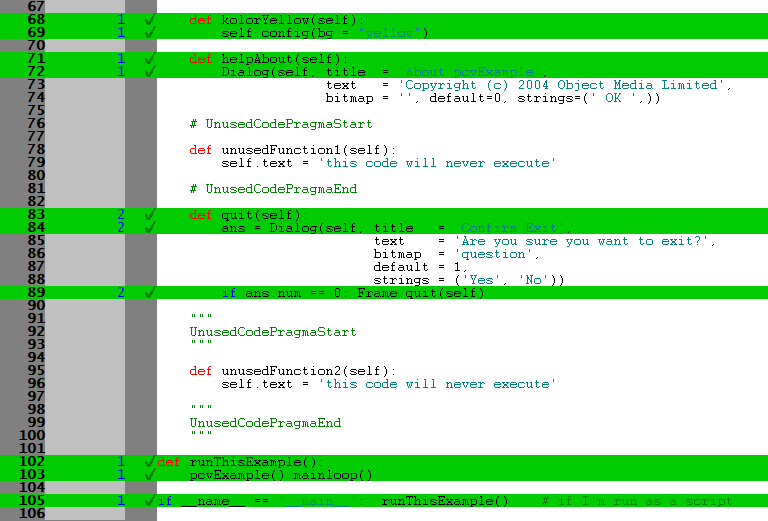
Sometimes, however, there are sections of code that you would like to exclude code coverage statistics for, but traditional filters cannot do the job. This is often the case when you want to exclude some error-handling code from your coverage testing. Code exclusion allows you to include markers in your source code comments to indicate which parts of your code to exclude.
In the picture below, you can see that unusedFunction1() and unusedFunction2() have been excluded (lines 78-79 and 95-96).
Code coverage data merging
If you’re like many companies, you’ve probably got a short test suite, an overnight test suite and a multi-day test suite. Each suite consists of many tests, and you’re wondering how to get code coverage for all of them.
Python Coverage Validator supports this by allowing code coverage results to be merged in real-time to a central session as each code coverage test is run, or for code coverage results to be merged into a session of your choice after the fact. The merged code coverage results can be reset manually or automatically when the target executable gets updated (changes timestamp or changes name). All of this can be controlled via the user interface and via the command line, providing you with complete control over the process.
Code coverage comparison
If you’re collecting code coverage for your test suite, you’ll want to compare code coverage to see if the test coverage increased or decreased with the new tests.
This is supported both graphically with a user interface and also from the command line.
Exporting code coverage data
Python Coverage Validator provides powerful HTML and XML reporting capabilities, allowing you to produce overnight code coverage reports as part of your regression testing strategy.
Compatible
Python Coverage Validator works with 32-bit Python versions from 2.2 to 2.7.
Regression test support
As well as the traditional code coverage role that Python Coverage Validator performs, it can be used for interactive code coverage testing and for creating code coverage reports automatically as part of a regression test suite and/or overnight build.
Command Line
Automate code coverage collection by launching Python Coverage Validator from the command line.
A full range of command line options allows you to perform unattended code coverage testing, complete with HTML export and XML export, to facilitate regression testing as part of your overnight builds.
Example 1 Launch an application. When the application completes, save the results and refresh some displays.
pCoverageValidator.exe -program "c:\myProgram.py"
                       -saveSession "c:\myResults\session1.pcvm"
                       -displayUI -refreshSummary -refreshLocks -refreshActiveObjects
Example 2 Launch an application. When the application completes, merge the coverage results with the loaded session and save the merged results.
pCoverageValidator.exe -program "c:\myProgram.py" -directory "c:\testarea" -hideUI
                       -loadSession "c:\myResults\session1.pcvm"
                       -mergeSessions
                        saveMergeResult "c:\myResults\session2.pcvm"
Example 3 Merge results from previous sessions.
pCoverageValidator.exe -hideUI
                       -loadSession "c:\myResults\session1.pcvm"
                       -loadSession2 "c:\myResults\session2.pcvm"
                       -mergeSessions
                       -saveMergeResult "c:\myResults\session1+2.pcvm"
Software Updates
Sorry, there are no software updates for Python Coverage Validator.
Legacy Software
This is the last version of Python Coverage Validator we released in 2014.
- The automatic configuration of Python Coverage Validator does not work because of changes to Windows since 2014. You will need to configure the Python runtime manually. Do this by following the instructions in the video at the top of this page.
- Our software codebase has changed quite a bit since 2014. Reaching the point where we can build a modern version of Python Coverage Validator will take some work. At that point we can consider software updates.
- There is no online documentation. Documentation is in Windows Help format (.chm) and is downloaded with the software.